
Definition
RCS (Rich Communication Services) in texting means an upgraded messaging system that enhances traditional SMS by allowing features like read receipts, typing indicators, high-quality media sharing, and Wi-Fi or mobile data messaging.
If you’ve ever opened your messaging app and noticed better-quality chats, typing dots, or “read” receipts suddenly appearing, you’ve probably come across RCS without even realizing it. In today’s digital world, texting is no longer just plain SMS—it’s evolving fast, and what does RCS mean in texting in text is one of the most searched questions for a reason.
People want smoother conversations, better media sharing, and real-time chat features without switching apps. That’s exactly what RCS brings to the table. Whether you’re chatting with friends, handling work messages, or just exploring new phone features, understanding RCS helps you know how modern texting actually works behind the scenes.
Let’s break it down in a simple, friendly, and practical way so you can fully understand it and use it confidently.
What Is RCS in Texting?
RCS stands for Rich Communication Services. It is a modern upgrade to traditional SMS and MMS messaging.
Unlike basic texting, RCS allows:
- High-quality image and video sharing
- Typing indicators (“… is typing”)
- Read receipts (seen messages)
- Group chat improvements
- Internet-based messaging instead of SMS network
Key Idea
RCS turns your regular messaging app into something similar to WhatsApp or iMessage—but built directly into your phone’s default messaging system.
Origin and Development of RCS
RCS was developed by the GSMA (Global System for Mobile Communications Association) as a universal upgrade for SMS.
Why it was created:
- SMS is outdated and limited (160 characters, no rich media)
- People moved to apps like WhatsApp and Messenger
- Telecom companies needed a modern alternative
Timeline (Simple View)
| Year | Development Stage |
|---|---|
| Early 2000s | SMS dominates texting |
| 2010s | Messaging apps rise (WhatsApp, iMessage) |
| 2016+ | RCS becomes global standard push |
| Today | Many Android phones support RCS |
How RCS Works in Real Life
RCS works using mobile data or Wi-Fi, not just cellular SMS networks.
When you send a message:
- If both users support RCS → rich chat features activate
- If not → it falls back to SMS
Example:
- You send a photo → it stays high quality with RCS
- With SMS → image gets compressed and low quality
Real-World Usage of RCS in Texting
RCS is already built into many Android messaging apps like Google Messages.
Common Uses:
- Daily chatting with friends
- Business communication
- Sending images/videos without quality loss
- Group chats with better control
- Real-time typing conversations
Examples of RCS Messages in Different Tones
Friendly Tone
“Hey! I just saw your message 👀”
Meaning: Natural, real-time chatting experience using RCS features like read receipts.
Casual Tone
“I’m on my way 🚗💨”
Meaning: Quick updates with emojis and media support.
Professional Tone
“I’ll send the document shortly.”
Meaning: Business-friendly messaging with better clarity and delivery tracking.
Excited Tone
“Check this video out 😍🔥”
Meaning: Sharing high-quality media through RCS.
RCS Features Explained
| Feature | Description |
|---|---|
| Read Receipts | Shows when message is seen |
| Typing Indicator | Shows when someone is typing |
| High-Quality Media | Sends photos/videos without compression |
| Wi-Fi Messaging | Works without cellular network |
| Group Chats | Better controls and naming |
| File Sharing | Send documents easily |
RCS vs SMS vs MMS (Comparison Table)
| Feature | SMS | MMS | RCS |
|---|---|---|---|
| Internet Required | ❌ | ❌ | ✅ |
| Read Receipts | ❌ | ❌ | ✅ |
| Typing Indicator | ❌ | ❌ | ✅ |
| Media Quality | Low | Medium | High |
| Group Chat | Basic | Limited | Advanced |
| Cost | Low | Medium | Free (data-based) |
Alternate Meanings of RCS
While in texting, RCS mostly means Rich Communication Services, it can also refer to:
- Remote Control System (engineering/tech)
- Radio Communication System (telecom/aviation contexts)
- Retail Chain System (business software usage)
However, in modern texting slang, the meaning is almost always related to messaging.
Why RCS Is Becoming Popular
RCS is trending because:
- It replaces outdated SMS limitations
- It works inside default messaging apps
- No need to install third-party apps
- Provides WhatsApp-like features natively
- Improves communication experience
Simply put:
It makes texting feel more modern, smooth, and interactive.
How to Know If You’re Using RCS
You might already be using it if you see:
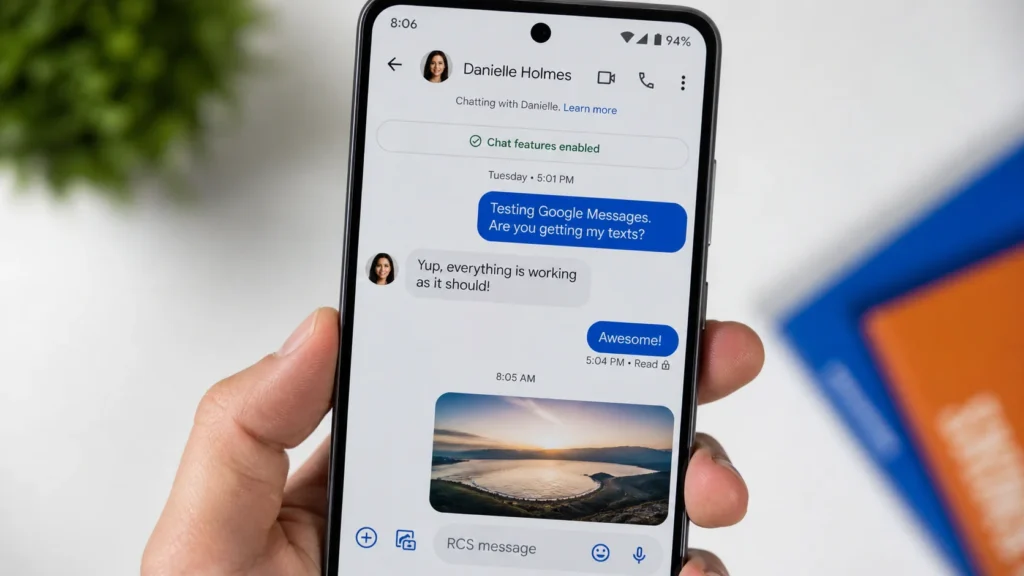
- “Chat features enabled”
- “Read” under messages
- Typing dots from contacts
- High-resolution images sent instantly
Most Android users using Google Messages already have it enabled.
When RCS Might Not Work
RCS may not function if:
- The other person doesn’t support it
- No internet connection
- Carrier doesn’t support RCS
- Chat features are turned off
In that case, it switches back to SMS automatically.
Polite or Professional Alternatives to RCS Chat Language
If you want more formal communication instead of RCS-style casual texting:
- “I acknowledge your message.”
- “Thank you for the update.”
- “I will respond shortly.”
- “Noted, I will follow up.”
- “Received, thank you.”
These are useful in workplace or formal settings.
FAQs:
1. What does RCS stand for in texting?
RCS stands for Rich Communication Services, a modern upgrade to SMS.
2. Is RCS the same as WhatsApp?
No, but it offers similar features like read receipts and media sharing inside your default messaging app.
3. Do I need the internet for RCS?
Yes, RCS works using mobile data or Wi-Fi.
4. Is RCS free to use?
Yes, it uses internet data instead of SMS charges.
5. How do I turn on RCS?
It is usually available in messaging app settings under “Chat features.”
6. Can iPhone use RCS?
RCS support is mostly for Android, but Apple has started limited support in newer updates.
7. Why is my RCS not working?
It may be due to carrier support, internet issues, or disabled chat features.
8. Is RCS better than SMS?
Yes, because it offers richer features like media sharing, typing indicators, and read receipts.
Conclusion
Understanding what does RCS mean in texting in text helps you see how modern messaging is evolving beyond simple SMS. RCS brings a smarter, more interactive way of chatting with features that make conversations feel real-time and expressive.
From read receipts to high-quality media sharing, it transforms how we communicate daily. Whether you’re texting friends or handling work messages, RCS makes everything smoother and more connected.
As messaging continues to evolve, RCS is becoming the future of default texting—simple, powerful, and built right into your phone.
Discover More Related Articles:
- Lamentation Mean in the Bible: Why It Matters for Christians in 2026
- Adam Mean in the Bible: Symbolism, and Impact in 2026