
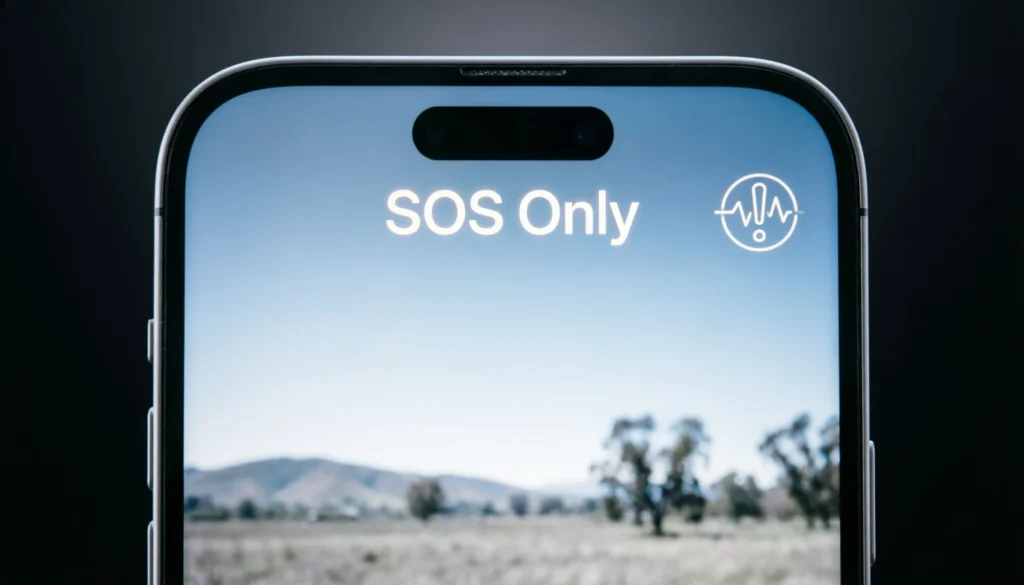

Definition
SOS on iPhone means your device is in Emergency SOS mode, which allows you to quickly call emergency services and share your location when needed.
If you’ve ever looked at the top corner of your iPhone and suddenly seen “SOS” or “SOS only,” it can feel confusing— even a little worrying. Many users assume something is wrong with their phone, SIM card, or mobile network. But in reality, SOS is a built-in safety feature designed to help you when you need urgent assistance.
Apple introduced Emergency SOS as a life-saving tool, allowing users to contact emergency services quickly, even in situations where normal calls or cellular service might not work properly. Over time, the feature has evolved, and now the SOS label can appear in several different scenarios.
In this guide, we’ll break down exactly what SOS means on iPhone, why it appears, how it works, and what you should do when you see it. You’ll also learn real-life examples, comparisons, and troubleshooting tips so you fully understand this important feature.
Origin and Purpose of SOS on iPhone
The term SOS originally comes from maritime distress signals, widely recognized as a universal call for help. While many people think it stands for “Save Our Souls” or “Save Our Ship,” it is actually not an abbreviation—it was chosen because the Morse code pattern (··· ——— ···) is easy to recognize.
Apple adopted SOS into iPhones as part of its emergency safety system to make sure users can always reach help, even in critical situations.
Why Apple Added SOS Mode
Apple designed SOS for:
- Emergency calling when you’re in danger
- Situations with weak or no mobile signal
- Accidental emergencies (like car crashes or falls)
- Quick access without unlocking the phone
This feature has become especially important with modern safety tools like Crash Detection and satellite connectivity in newer iPhones.
What Does SOS or SOS Only Mean on iPhone?
When your iPhone shows SOS or SOS Only, it means:
- Your phone is not connected to your regular mobile network
- BUT you can still make emergency calls
- Your device may have limited or no signal for normal calls, texts, or data
This is not always an error—it’s a fallback safety mode.
Common Reasons SOS Appears
- Weak cellular coverage in your area
- SIM card issue or not detected properly
- Carrier outage
- Traveling outside your network coverage zone
- Temporary network glitch
- Airplane mode or incorrect settings
How Emergency SOS Works on iPhone
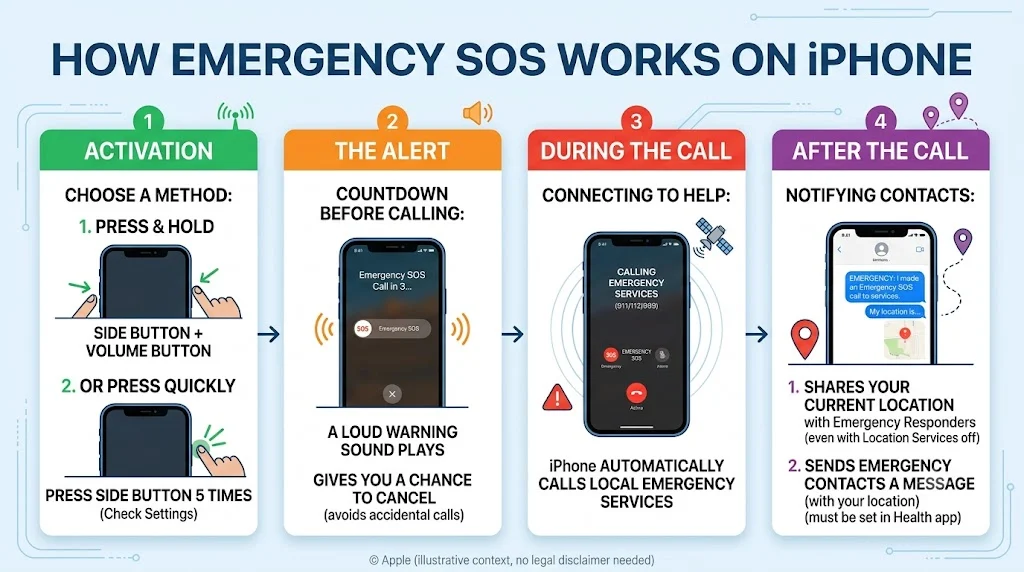
Apple’s Emergency SOS feature is designed to act fast. You can activate it in several ways:
Manual Activation
- Press and hold Side button + Volume button
- Or press Side button 5 times quickly (depending on settings)
What Happens After Activation
- iPhone automatically calls emergency services
- Shares your location with responders
- Sends emergency contacts a message (if set)
- Starts a countdown before calling (to avoid accidental triggers)
SOS vs SOS Only vs No Service
Here’s a simple comparison to understand the difference:
| Status on iPhone | Meaning | Can You Call? | Internet Access |
|---|---|---|---|
| SOS Only | No network, emergency calls allowed | Yes (emergency only) | No |
| SOS | Emergency mode active or weak network | Yes (emergency only) | No |
| No Service | No signal at all | No | No |
| Full Signal | Normal connection | Yes | Yes |
Real-Life Examples of SOS Usage
Example 1: Traveling in Remote Areas
You’re hiking in mountains where your carrier doesn’t have coverage. Your iPhone shows “SOS Only,” but you can still call emergency services if needed.
Example 2: SIM Card Problem
Your SIM card is not inserted properly. Your phone shows SOS, meaning it cannot access your network but still allows emergency calls.
Example 3: Network Outage
Your mobile provider is temporarily down in your city. Your iPhone switches to SOS mode automatically.
Emotional or Contextual Tone of SOS in Messages
SOS on iPhone is mostly technical, but it can carry emotional weight depending on context.
Neutral Usage
- “My phone is on SOS mode because I’m out of coverage.”
Concerned Usage
- “Why is my iPhone stuck on SOS only? I can’t call anyone!”
Emergency Context
- “I used Emergency SOS when I felt unsafe at night.”
Common Misunderstandings About SOS
Many users panic when they see SOS, but here are some clarifications:
❌ Misconception 1: Your iPhone is broken
✔ Reality: It usually means no network, not device damage
❌ Misconception 2: You are being tracked or in danger
✔ Reality: It is just a signal status indicator
❌ Misconception 3: SOS means airplane mode
✔ Reality: Airplane mode is different and fully disables signals
Related Terms and Comparisons
Emergency SOS vs Regular Calling
- Emergency SOS bypasses normal network restrictions
- Regular calling requires full carrier service
SOS vs “No SIM”
- SOS: SIM detected but no network available
- No SIM: SIM missing or not working
SOS vs Wi-Fi Calling
- SOS: Uses emergency cellular fallback
- Wi-Fi calling: Uses internet to make normal calls
Alternatives and What You Can Do
If you see SOS often, here are professional troubleshooting steps:
Quick Fixes
- Turn Airplane Mode on/off
- Restart your iPhone
- Reinsert SIM card
- Move to a location with better signal
Settings Check
- Go to Settings > Cellular
- Check carrier settings update
- Reset network settings if needed
When to Contact Carrier
- If SOS persists for hours or days
- If other devices on same network are affected
- If SIM is not detected at all
Example Table: SOS Situations Explained
| Situation | Why SOS Appears | What You Should Do |
|---|---|---|
| Traveling abroad | No roaming coverage | Enable roaming or use local SIM |
| Rural area | Weak signal | Move location |
| Carrier outage | Network down | Wait or check carrier updates |
| SIM issue | Faulty or loose SIM | Reinsert SIM card |
| Software glitch | System error | Restart device |
Why SOS Feature Is Important
The SOS system is more than just a signal indicator—it’s a safety tool.
Key Benefits
- Helps in emergencies when no network is available
- Works even in low-signal environments
- Automatically contacts emergency services
- Can alert trusted contacts
- Provides location sharing for rescue
This makes it one of the most important safety features in modern smartphones.
FAQs
1. What does SOS mean on my iPhone status bar?
It means your phone has no normal network but can still make emergency calls.
2. Why is my iPhone stuck on SOS only?
This usually happens due to weak signal, SIM issues, or carrier problems.
3. Can I still use the internet in SOS mode?
No, internet and normal calls are not available in SOS mode.
4. Is SOS a serious problem?
Not always. It usually means network issues, not phone damage.
5. How do I remove SOS from my iPhone?
Try restarting your phone, checking SIM card, or moving to a better signal area.
6. Does SOS mean I am in danger?
No, it is just a network status indicator.
7. Can I still make emergency calls in SOS mode?
Yes, that is the main purpose of SOS mode.
8. Why does SOS appear when I travel?
Because your carrier may not support coverage in that area.
Conclusion
The SOS indicator on iPhone is often misunderstood, but it is actually a powerful safety feature designed to ensure you can always reach help when needed. Whether it appears due to weak signal, SIM issues, or traveling outside coverage areas, SOS simply means your phone is prioritizing emergency communication.
Instead of worrying when you see SOS, it helps to understand that your iPhone is still functional for emergency use. With a few quick checks like restarting your phone, adjusting settings, or moving to a better signal area you can usually restore normal service easily.
In short, SOS is not a warning of danger it’s a built-in safety net that ensures you’re never completely disconnected when it matters most.
Discover More Related Articles:
- Unhinged Meaning | Psychology & Everyday Language In 2026
- AWOL Mean | When Someone Disappears Without Notice In 2026