
Definition:
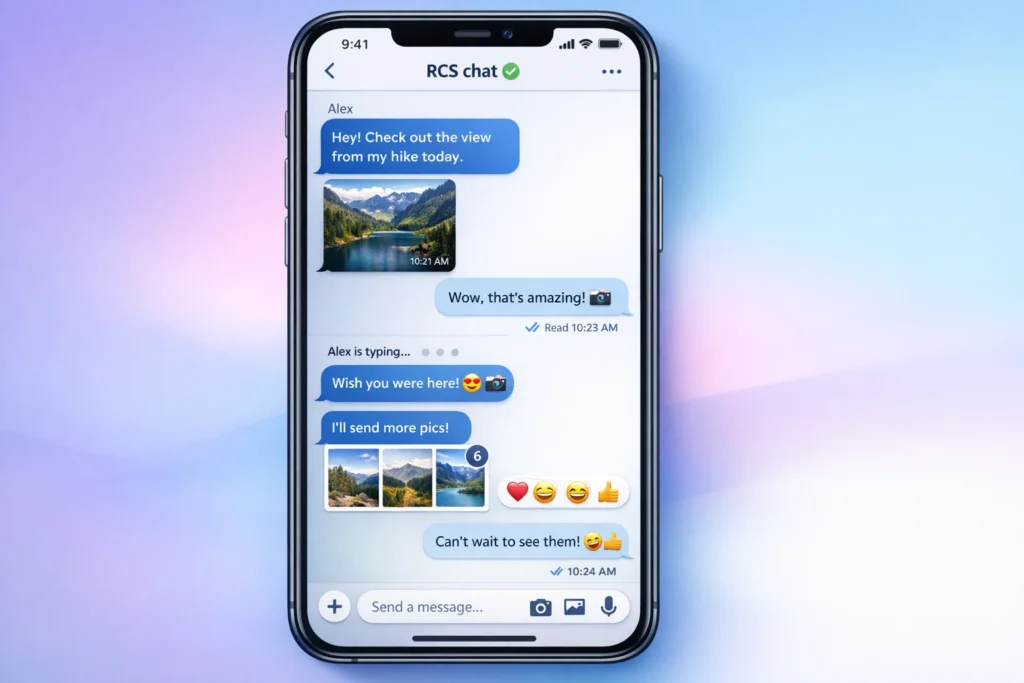
An RCS message (Rich Communication Services message) is an upgraded form of SMS texting that allows users to send messages with advanced features like high-quality images, typing indicators, read receipts, file sharing, and real-time chat over mobile data or Wi-Fi instead of traditional SMS.
If you’ve ever opened your messaging app and noticed “RCS chat,” “chat message,” or richer texting features suddenly appearing, you might have wondered what’s actually going on behind the scenes. That’s where RCS messaging comes in.
In simple terms, RCS is what makes texting feel more like WhatsApp, iMessage, or Messenger but inside your regular SMS app. No extra download needed.
It’s becoming more common worldwide as Android and mobile carriers slowly upgrade from old-school SMS to smarter messaging systems. But many people still don’t fully understand what it means when they see “RCS message” in their chat.
Let’s break it down in a simple, real-world way so you know exactly what it is, how it works, and why it matters in everyday texting.
Origin of RCS Messaging and Why It Exists
RCS was created as a modern replacement for SMS (Short Message Service), which has been around since the early 1990s.
Back then, texting was simple:
- Only plain text
- No internet required
- No read receipts or typing indicators
- Character limits (160 characters)
As smartphones evolved, apps like WhatsApp, Telegram, and iMessage introduced richer communication features. SMS started feeling outdated.
So, the mobile industry developed RCS (Rich Communication Services) to bring SMS into the modern era.
Key timeline:
- 2007–2010: RCS concept introduced by GSMA (global mobile network association)
- 2016+: Android started testing RCS features in Google Messages
- 2020–present: Global rollout through carriers and Google
Today, RCS is slowly replacing SMS on many Android devices.
How RCS Messages Work in Real Life
When you send a message using RCS, it doesn’t travel like a traditional SMS.
Instead, it uses:
- Mobile data
- Wi-Fi connection
- Internet-based messaging servers
This allows it to support advanced features like:
- Read receipts (✔✔)
- Typing indicators (“Typing…”)
- High-resolution images and videos
- File sharing (PDFs, documents, etc.)
- Group chats with better control
- Voice notes and emojis with reactions
If the recipient doesn’t have RCS enabled, the message usually falls back to SMS or MMS automatically.
Key Features of RCS Messaging
Here’s a simple breakdown of what makes RCS different:
| Feature | SMS | RCS |
|---|---|---|
| Internet required | ❌ | ✅ |
| Read receipts | ❌ | ✅ |
| Typing indicator | ❌ | ✅ |
| High-quality media | ❌ | ✅ |
| Group chat features | Basic | Advanced |
| File sharing | ❌ | ✅ |
| Character limit | 160 | No fixed limit |
RCS basically transforms your boring text messages into a modern chat experience.
Real-World Usage of RCS Messages
RCS is mostly used automatically you don’t “send an RCS message” manually. Instead, your phone decides it.
You’ll see RCS messages in situations like:
- Chatting with someone on Android using Google Messages
- Sending images or videos in full quality
- Messaging over Wi-Fi instead of SMS charges
- Seeing “Read” or “Delivered” indicators in chat
Example scenarios:
Friendly tone:
You send a birthday photo to your friend and see “Delivered” instantly with read receipts.
Neutral tone:
A group chat shows who has read your message in real time.
Work tone:
You send a PDF file through messaging instead of email.
RCS Message Examples in Context
Here are some practical examples to understand better:
Example 1: Basic Chat Upgrade
- Old SMS: “Hey, are you coming?”
- RCS: “Hey, are you coming?” + typing indicator + read receipt
Example 2: Media Sharing
- Old SMS: Blurry compressed image
- RCS: High-quality original photo
Example 3: Group Chat
- Old SMS: Basic group text
- RCS: Naming groups, adding/removing members, reactions
RCS vs SMS vs MMS (Simple Comparison)
Many people confuse these three. Here’s a clear breakdown:
| Type | Full Form | Internet Required | Features |
|---|---|---|---|
| SMS | Short Message Service | ❌ | Text only |
| MMS | Multimedia Messaging Service | ❌ | Images/videos (low quality) |
| RCS | Rich Communication Services | ✅ | Modern chat features |
Simple explanation:
- SMS = old basic texting
- MMS = slightly upgraded multimedia texting
- RCS = modern chat app inside your default messaging app
Devices and Apps That Support RCS
RCS is mostly available on Android phones through:
- Google Messages app
- Samsung Messages (in some regions)
- Carrier-supported messaging apps
On iPhones:
- Apple currently uses iMessage instead of RCS
- However, RCS support is gradually expanding in some updates
Is RCS Safe or Secure?
RCS offers better security than SMS, but it depends on implementation.
Security features:
- Encryption in transit (in many apps like Google Messages)
- Spam protection
- Verified business messaging
However:
- Not all RCS chats are end-to-end encrypted by default
- Security depends on app and carrier
Alternate Meanings of RCS (Rare Cases)
In texting, RCS almost always means Rich Communication Services.
But in rare technical or business contexts, RCS can also mean:
- Remote Control System
- Rocket Control System
- Regional Communications System
However, in mobile messaging, it almost always refers to Rich Communication Services.
Polite or Professional Alternatives to RCS Messaging
If you’re communicating professionally and don’t want confusion, you can refer to it as:
- “Enhanced messaging service”
- “Internet-based chat messaging”
- “Advanced SMS system”
- “Smart messaging platform”
Example:
Instead of saying “Send via RCS,” you can say:
👉 “Send it through chat messaging or enhanced SMS.”
Common Misunderstandings About RCS
Many users think:
❌ RCS is a separate app
✔ It actually works inside your default messaging app
❌ You must turn it on manually every time
✔ Usually it activates automatically
❌ It replaces WhatsApp or Messenger
✔ It only upgrades SMS, not replaces social apps
FAQs
1. What does RCS message mean in texting?
It means a modern SMS upgrade that allows internet-based messaging with advanced features like read receipts and media sharing.
2. Is RCS better than SMS?
Yes, RCS is more advanced with richer features, but SMS still works without internet.
3. Do both people need RCS for it to work?
Yes, both sender and receiver must have RCS enabled for full features.
4. Why does my message say RCS chat?
It means your phone is using internet-based messaging instead of SMS.
5. Is RCS free to use?
Yes, it uses mobile data or Wi-Fi, not SMS charges.
6. Can RCS messages be hacked?
They are generally secure, but encryption depends on the app used.
7. How do I turn off RCS messaging?
You can disable it in Google Messages settings under “Chat features.”
8. What happens if RCS is not available?
Your message automatically switches to SMS or MMS.
Conclusion
RCS messaging is basically the next generation of texting. Instead of plain, limited SMS messages, it gives you a full chat experience with modern features like typing indicators, high-quality media sharing, and read receipts all inside your regular messaging app.
It’s slowly replacing old SMS systems and making mobile communication feel more like WhatsApp or iMessage without needing extra apps.
If you’ve seen “RCS message” on your phone, now you know it simply means your texting has been upgraded to a smarter, internet-powered system. Understanding it helps you stay ahead of modern communication trends and use your phone more effectively in everyday conversations.
Discover More Related Articles:
- B Width Mean in Shoes: Fit, Sizing, and Comfort Tips for 2026
- Repentance Mean in the Bible: Powerful Truth Most People Miss In 2026