

Definition
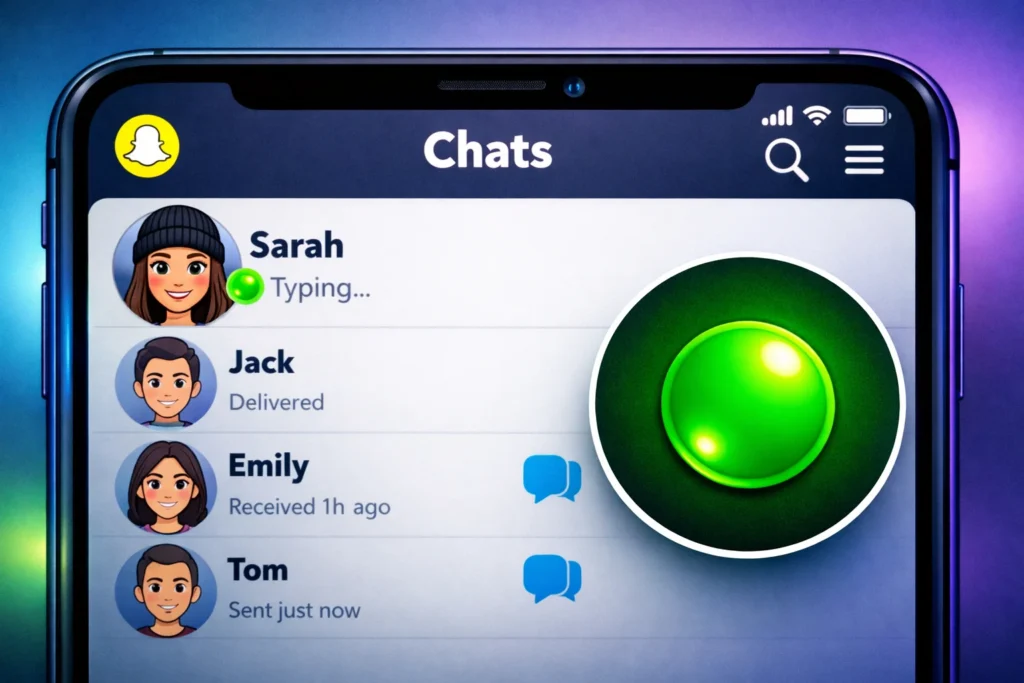
The green dot on Snapchat in text is a small activity indicator that shows a user is currently active or recently active on the app.
If you’ve ever opened Snapchat and noticed a small green dot next to someone’s Bitmoji or profile, you’re not alone in wondering what it means. This tiny icon plays a big role in how users interact on the platform, especially in Snapchat chats.
In today’s fast-paced digital communication, people want to know who is online, who is active, and who might respond quickly. That’s exactly where the green dot becomes useful.
Snapchat, known for its disappearing messages and real-time engagement, uses indicators like this to make chatting more interactive and responsive. But the meaning isn’t always obvious, especially for new users.
In this guide, we’ll break down everything you need to know about the green dot on Snapchat in text, including its meaning, usage, variations, comparisons, and real-life examples.
Origin of the Green Dot on Snapchat
The green dot feature was introduced as part of Snapchat’s ongoing effort to improve real-time communication awareness.
Originally, Snapchat focused heavily on privacy and disappearing content. However, as messaging features expanded, users needed a way to know when friends were online—similar to Facebook Messenger or WhatsApp’s “online” status.
Why Snapchat Added It:
- To show user activity status
- To improve chat responsiveness
- To help users know when friends are available
- To enhance social engagement in real time
Over time, the green dot became a subtle but important part of Snapchat’s interface, especially in the chat section.
What Does the Green Dot Mean on Snapchat in Text?
The green dot on Snapchat in text means a user is currently active or recently active on Snapchat. It usually appears in the chat list or next to Bitmoji icons.
Key Meaning:
- 🟢 The person is online now or recently active
- 🟢 They may be available to chat
- 🟢 They are using Snapchat at that moment or just used it
It is important to note that it does not always mean the person is actively chatting—it only shows app activity.
How the Green Dot Works in Snapchat
Snapchat uses activity tracking signals to determine whether a user is active.
The green dot appears when:
- The user has recently opened Snapchat
- The app is running in the background (in some cases)
- The user is actively using features like chat, snaps, or stories
The green dot disappears when:
- The user is inactive for a while
- Snapchat is fully closed or not in use
- Activity status times out
Real-World Usage of the Green Dot
The green dot is widely used in everyday Snapchat communication. It helps users decide when to send messages or start conversations.
Example Scenarios:
- Friendly tone: “Oh, she has a green dot, she’s online! I’ll text her now 😊”
- Neutral tone: “He’s active on Snapchat, the green dot is showing.”
- Impatient tone: “You were online (green dot), but didn’t reply?”
- Dismissive tone: “Green dot doesn’t mean they’ll respond immediately.”
Green Dot vs Other Snapchat Indicators
Snapchat uses several indicators to show user activity and engagement.
Comparison Table
| Indicator | Meaning | Where It Appears |
|---|---|---|
| 🟢 Green Dot | User is active or recently active | Chat list / Bitmoji |
| 👻 Bitmoji Activity | User recently used Snapchat | Profile or chat |
| 🔴 Snap Indicator | Unopened Snap message | Chat inbox |
| ⏰ Last Active Time | Shows time since last activity | Friend profile |
Green Dot vs “Typing…” Indicator
Many users confuse the green dot with the “typing” indicator, but they are not the same.
- Green Dot: Shows general online activity
- Typing Indicator: Shows the user is actively typing a message
Key Difference:
The green dot is passive, while typing status is active and real-time.
Alternate Meanings of the Green Dot
While the green dot on Snapchat has a specific meaning, it can sometimes be confused with other platform indicators.
Other Possible Interpretations:
- Instagram: Online status indicator (similar green dot concept)
- WhatsApp: “Online” status (no dot but similar function)
- Facebook Messenger: Active status dot
However, on Snapchat, it is strictly tied to user activity visibility.
Does the Green Dot Always Mean Someone Is Available?
Not necessarily.
Even if someone has a green dot:
- They may be browsing stories
- They may be multitasking
- They may not be actively checking chats
- They may have the app open but not using it
So, while it suggests activity, it does not guarantee immediate response.
Privacy Concerns and Control Settings
Snapchat allows users to control their activity status visibility.
Users can:
- Turn off activity status
- Hide presence from friends
- Limit who sees their online activity
Why users disable it:
- Privacy concerns
- Avoid pressure to reply instantly
- Reduce social expectations
Polite Alternatives When Using Green Dot Awareness
Instead of directly referencing someone’s activity status, here are more polite ways to communicate:
- “Hey, are you free to chat?”
- “Let me know when you’re available.”
- “No rush, just reply when you can.”
- “I saw you might be online, but take your time.”
These alternatives feel more respectful and less intrusive.
Common Misunderstandings About the Green Dot
Many users misinterpret what the green dot means.
Misconceptions:
- ❌ It means someone is actively chatting
- ❌ It shows exact location
- ❌ It guarantees instant reply
- ❌ It appears for all friends at all times
Reality:
- ✔ It only shows recent or current app activity
- ✔ It does not guarantee engagement
- ✔ It can sometimes be delayed or inaccurate
Examples of Green Dot Usage in Conversations
Example 1: Casual Chat
- A: “Are you free?”
- B: “Yeah, I see your green dot, so I thought you were online 😄”
Example 2: Misunderstanding
- A: “You were online but didn’t reply?”
- B: “I just opened Snapchat for a second.”
Example 3: Neutral Observation
- “The green dot shows she’s active, maybe she’ll respond soon.”
Why Snapchat Uses the Green Dot Feature
Snapchat designed this feature to improve:
- Real-time communication
- User engagement
- Social awareness
- Chat responsiveness
It makes conversations feel more alive and immediate, which aligns with Snapchat’s core design philosophy.
Tips for Using Snapchat Activity Indicators Wisely
- Don’t assume someone is ignoring you just because they don’t reply
- Avoid over-checking green dot status
- Respect others’ privacy settings
- Use it as a guide, not a rule
- Focus on conversation quality, not just timing
FAQs
1. What does the green dot mean on Snapchat chat?
It means the user is currently active or recently active on Snapchat.
2. Does the green dot mean someone is chatting?
No, it only shows app activity, not active chatting.
3. Can someone hide the green dot on Snapchat?
Yes, users can turn off their activity status in settings.
4. Why is the green dot not showing for some friends?
They may have disabled activity status or haven’t been active recently.
5. How long does the green dot stay on Snapchat?
It usually disappears shortly after the user becomes inactive.
6. Is the green dot always accurate?
Not always. It can sometimes be delayed or not reflect real-time activity.
7. Does the green dot mean someone saw my message?
No, it only indicates activity, not message read status.
8. Is green dot available on all Snapchat versions?
Yes, but visibility may vary depending on app updates and settings.
Conclusion:
The green dot on Snapchat in text is a simple but powerful feature that helps users understand when friends are active or recently active on the app. While it improves communication timing and engagement, it should not be taken as a strict indicator of availability or response behavior.
In short:
- 🟢 It shows activity, not commitment
- 🟢 It helps timing conversations better
- 🟢 It is optional and privacy-controlled
- 🟢 It enhances Snapchat’s real-time experience
By understanding it properly, you can use Snapchat more effectively and avoid common misunderstandings in digital conversations.
Discover More Related Articles:
- “En” Mean in Spanish: How “En” Differs From “Sobre” in 2026
- What Does NT Mean in Gaming?: Ranked Matches in 2026